Unity version : 2021.3.27f1 지난번에는 Tilemap 위에서 player를 위에 올려놓는 방법을 알아봤습니다. 이제는 Player가 움직일 수 있도록 해 보겠습니다.
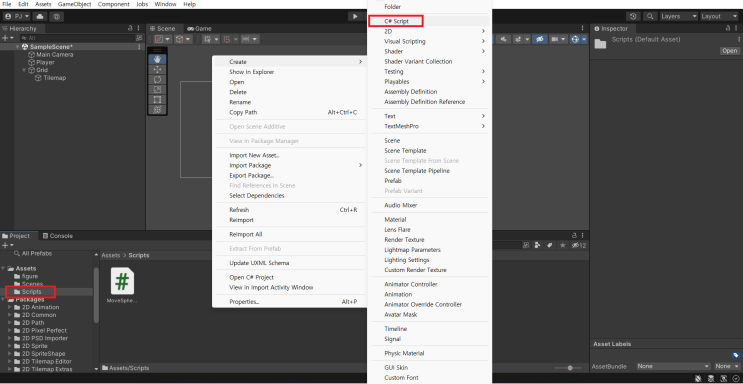
좌우 움직임과 점프를 추가해 보겠습니다. 먼저 Assets에 Scripts라는 폴더를 추가 했습니다.
그리고 폴더 위에서 우클릭 해 C# Script를 추가합니다. 그리고 코드를 아래와 같이 입력합니다. using System.Collections; using System.Collections.Generic; using UnityEngine; public class MoveSphere : MonoBehaviour { private bool IsJumping = false; private Rigidbody2D rigid; // Start is called before the first frame update void Start() { rigid = GetComponent
#
Unity
#
유니티플레이어이동
#
유니티물리엔진
#
유니티2D
#
유니티
#
Unity왕초보
#
UnityTutorial
#
UnityRigidbody
#
UnityPlayerMove
#
UnityPlayerJump
#
UnityCollision
#
Unity2D튜토리얼
#
Unity2d
#
Unity2021
#
유니티플레이어점프